SurveilStar provides an easy and reliable way to monitor and control devices over a network. Whenever USB mass storage media is inserted or released from any agent’s machine it alerts the administrator by sending a message notification to prevent data loss.
SurveilStar helps you effectively control the access permissions of various kinds of devices, including storage device, communication device, USB device, Bluetooth device, dial-up device, burning device, network device. It effectively and efficiently prevents sensitive data from leaking out via these devices.
Processor, DVD drive, CD drive, keyboard, mouse, network adapters, printers … SurveilStar can record computer hardware and software assets information in details, of every single monitored computer.


IT manager can control the use of these assets. If someone tries to add, delete or change these monitored assets, alert message can be sent to administrator, and control policies, such as Disable Device or Lock Computer, can be automatically triggered and applied to stop potential sabotage.
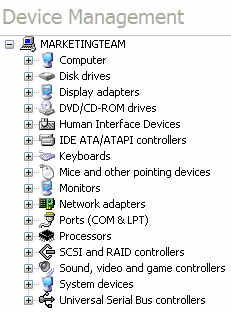
SurveilStar records all software changes and hardware changes and record Add, Delete or Change operation types.
Many employees may use a removable device to copy documents in company, this may lead to a critical data leakage. You can create a device policy to decide what devices can be used.
To protect corporate information from leakage and data theft, the use of devices should be tracked and controlled carefully. SurveilStar tracks, records and controls all device connections and operations.
You can control storage devices like Floppy, DVD/CD-ROM, burning device, tape, removable device, etc., control communication interface devices like bluetooth, modem, USB controller, 1394 controller, etc, control USB devices like USB keyboard, USB mouse, USB storage, USB harddrive, USB DVD-ROM, etc., control dial-up devices, network devices and other devices.
SurveilStar supports:
| Type | Device |
| Storage devices | Floppy Drive, Tape drive |
| DVD/CD-ROM drive | |
| Burning devices | |
| USB Flash drive, removable drive, memory stick, smart card, MO and ZIP drive | |
| Communication devices | COM, LTP, USB, SCSI, 1394, Infrared, PCMCIA, Bluetooth, MODEM |
| Direct Lines (between two computers using USB cable , COM port or Serial cables) | |
| Network devices | Wireless LAN Adapter |
| PnP Adapter (USB, PCMCIA) | |
| Virtual LAN Adapter | |
| Dial-up Connection | |
| USB devices | USB Keyboard, USB Mouse |
| USB Modem, USB LAN Adapter | |
| USB CD-ROM, USB Storage, USB Hard disk | |
| USB Image Device (Webcam, Digital Camera and Scanner) | |
| Others | Audio device, video device, and game device |
| Virtual CD-ROM | |
| Any new devices plug-in |
SurveilStar can track the usage of removable storage devices in all monitored computers. Whenever a removable storage plugs-in or plugs-off, SurveilStar records the type of the device, time, computer name and user name, volume ID, description and volume label.
SurveilStar can prevent information leakage and authorized transfer by controlling the use of removable storage devices. Administrator can determine whether or not a removable device is allowed to be used on monitored computer, with Read ability or Write ability.
And the files wrote to removable device can be encrypted so that only authorized computer agents can decrypt and read the files.
| Ability | Description |
| Read | Free to read any files from removable specified storage device |
| Decrypt when reading | Files are only decrypted using Explorer.exe to copy files from removable storage to local or network disks. This option is enabled when Read is checked. |
| Write | Free to write any files to removable specified storage device |
| Encrypt when writing | Prohibit any application program to copy any files to removable storages except using Explorer.exe This option is only enabled when Write is checked |
The priority of Document Control Policy is higher than Removable Storage Policy.
For instance, if a removable storage policy allows writing documents to removable storage, at the meantime, a document control policy prohibits copying documents to removable device, the documents will not be transferred to the removable device.

