Not using latest version of SurveilStar? Download upgrade package now.
We recommend you visit our website time and time and always upgrade your SurveilStar to latest version. Generally speaking, the latest version will fix some bugs and add some more useful features. If you want to learn the details of version upgrade, please check Version Upgrade History.
Please note that upgrading to latest version is free of charge, but upgrading license is not. You need to purchase more license for upgrading license number.
Download SurveilStar Upgrade Package on SurveilStar Server machine, or download it from other computer and copy to SurveilStar Server. Double click the upgrade package. Then SurveilStar Server, SurveilStar Console on server machine(if installed) and SurveilStar agents on all online computers will be upgraded to latest version.
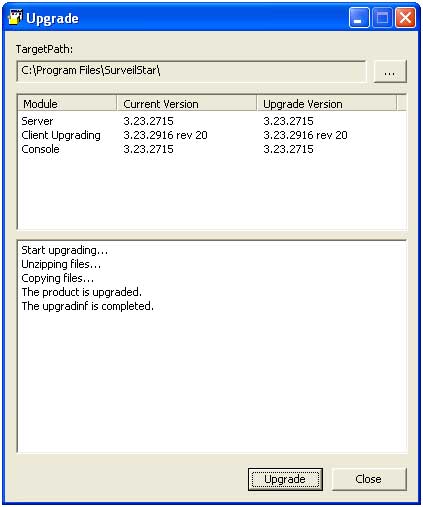
Note: If you can't upgrade, please exit all SurveilStar services at first. You can open Task Manager, click Processes tab and you should be able to find OControl3.exe(if console installed), OGuard3.exe and OServer3.exe, choose them and click End Process. Then run the upgrade package again.
Log on to SurveilStar Console and it would track and upgrade to the latest version automatically.
SurveilStar agents won’t upgrade automatically after the SurveilStar server has been successfully upgraded. You can upgrade via menu 【Tools > Server Management > Agent Update Management】.
| Register SurveilStar and Upgrade License | Back to Index | Log on SurveilStar Console |
