Print monitoring and metering can save millions of dollars for a corporation in hardware, paper, and wasted time. Print Monitoring gives management an unprecedented power for the first time to analyze, when a printer is under- or over-utilized.
SurveilStar is an advanced printer usage monitoring product allowing you to control the efficiency of your company's printer usage. With this powerful printer activity monitor you can easily monitor and audit your printers and find out which documents are printed on each of the selected printers, which employees use printers most often, the number of pages printed, on which printer and when the document was printed, etc.
Most office managers don't have an understanding of how many pages each employee is printing in a year or in a week. What time of the day the printer is used the most or what time of the day the printer is idle. Since management does not have the critical information of how many pages are being printed and who does the most printing, offices end up with over capacity. Office equipment suppliers routinely "over-sell" expensive high-end printers to their customers.
With SurveilStar Printer Activity Monitor, one can quickly and precisely assess an office need and calculate the printer hardware needed for the office. Identifying printing habits of individuals or the office and allocating resources accordingly can reduce paper waste by eliminating reprints and identifying faulty devices. A defective printer with faulty paper feed can cost a lot for an office in wasted time and wasted paper because of frequent paper jams resulting in reprinting.


SurveilStar is an outstanding Printer Activity Monitor software which records every details of printing activities including applications, time, pages, captions, users, computers, print tasks, and many more.
SurveilStar Printer Activity Monitor is presented in three modules. The first one(Agent) is works as system service and tracks every document printed. The second module(Server) calculates this data and third module(Console) generates reports and diagrams.
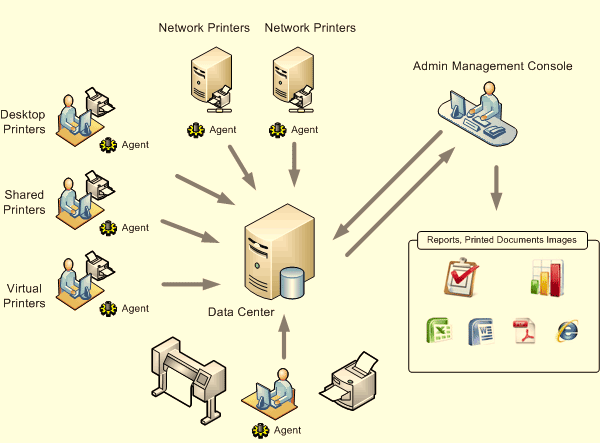
How to Deploy SurveilStar Monitoring Software
The SurveilStar Printer Monitor will collect information about the printing on the fly. The information is transmitted, by the transport module, to the SurveilStar Server through TCP/IP. The Server can collect data from one or more computers. Finally all data is stored in a database, and administrators can login SurveilStar Console to view the printer activities.
Law offices - Track printing done on the behalf of a client and create billable amounts based on generated reports.
Business Offices - Determine utilization of office or department printers.
Internet Cafes - Generate a report for a specific user or computer during an elapsed period of time.
Print Shops - Created billable amounts for a specific printer or computer over an elapsed period of time, also track whether printing was black and white or color.
Schools - Analyze use of school printers to determine if they are being overused by faculty or students.
