SurveilStar Web Monitor is a 30-day free web activity recording program which can help you to capture visited website, sent and received mails, MSN messages and transferred FTP files.
Compatible systems: Win2000 SP4 / XP SP2 / 2003 SP1 / Vista / 2008 / Win7 / 8


Please make sure to follow the steps below to deploy SurveilStar employee monitoring software. There are 4 steps:
SurveilStar monitoring system requires a SQL data server to store and feed the collected data. The server can be deployed on a dedicated computer or any computer deemed appropriate to be used as a data server, according to the following requirements:
In choosing SQL Server application, you can select one of the free editions or pay to buy the enterprise edition. When selecting a version of SQL Server, you should review and follow the installation instructions suggested by Microsoft.
| SQL Server | Note | |
| Free edition | MSDE 2000 SP4 | Maximum storage capacity: 2 GB. Not compatible with Vista. Included in SurveilStar setup file. |
| SQL Server 2005 Express SP1 | Maximum storage capacity: 4 GB. | |
| SQL Server 2008 (R2) Express | Maximum storage capacity: 10 GB. | |
| Enterprise edition | SQL Server 2000 SP4 | Please contact Microsoft to get enterprise edition. |
| SQL Server 2005 SP1 | ||
| SQL Server 2008 or 2008 R2 |
Note: Before installing SQL Server, you may need to update Windows Installer, .Net Framework and Windows PowerShell. If you have installed them or newer version, you can skip the steps below.
Version after 3.11 supports MSDE as the built-in database engine. For data size less than 2G bytes, No other database systems such as SQL Server are required. We recommend use this engine when 5 or less computers are being monitored and snapshot capture is not enabled.
If you use SQL Server 2005 SP1 or above, please make sure you follow the instructions in the manual since you need to manually set configurations in some important steps, otherwise, wrong configuration may lead to server launch failure. When using SQL Server 2005 SP1 or above as database server, please uncheck MSDE when you install the SurveilStar server.
Before installing SurveilStar Server, please make sure the SQL Server application is running. You can download SurveilStar setup file from our website.
SurveilStar Server should be installed in the same computer with the SQL Server application. When prompted to select components, choose SurveilStar Server, and then proceed.
The installation of SurveilStar Console uses the same setup file as installing the SurveilStar Server. Select SurveilStar Console when prompted to select components, and then proceed.
SurveilStar Agent should be deployed to computers that are required to be monitored and controlled. The Agent can install in silence mode and run in stealth mode.
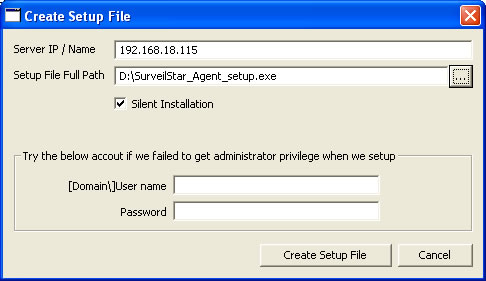
Step 1. Create SurveilStar Agent setup file
On the desktop of the server, click "Start > All Programs > SurveilStar > Agent Installation Generator"
Step 2. Copy the setup file to target computers
Step 3. Double-click the setup file to install the Agent.
Find complete online how-to guides.
